How to Scale Email Outreach: A Guide to High-Volume Sending
TL;DR
Scaling cold email safely requires more than increasing volume. Instead of pushing more emails from one inbox, distribute sending across multiple warmed inboxes and secondary domains. Configure SPF, DKIM, and DMARC before launching campaigns, and run automated warm-up continuously to maintain positive engagement signals. Rotate inboxes, vary messaging to avoid predictable patterns, and monitor bounce rates, blacklist status, and domain health weekly. When infrastructure and reputation are managed deliberately, you can increase volume without sacrificing inbox placement.
Scaling cold email sounds simple in theory. You find a message that works. Replies come in, so you decide to send more.
That’s where most teams run into deliverability problems.
Unfortunately, you can’t jump from 30 emails a day to 500 from one inbox. Google and Outlook track sending behavior closely. Sudden volume spikes, poor engagement, or weak authentication can push your emails straight into spam.
To scale safely, you need multiple inboxes, proper authentication, and ongoing reputation management.
Key takeaways
- Scale horizontally, not vertically. Spread volume across multiple inboxes and domains instead of pushing one account too hard.
- Warm-up never stops. Automated warm-up protects your reputation before and during campaigns.
- Authentication is mandatory. SPF, DKIM, and DMARC must be configured correctly before scaling.
- Rotate senders and vary content. Avoid predictable patterns that trigger spam filters.
- Monitor domain health weekly. Blacklists, bounce rates, and open rate drops are early warning signs.
The challenge of scaling cold email
Deliverability rarely collapses overnight. It erodes over time.
You might notice:
- Open rates dropping below 30%
- Replies slowing down
- Test emails landing in spam
- Bounce rates creeping above 2%
By the time those signals appear, reputation may already be weakened.
Three common issues cause most scaling failures:
Volume spikes
New or lightly used inboxes can’t handle large jumps in daily sends. Sudden increases signal automation and bulk behavior.
Single inbox dependency
Every inbox and domain has practical limits. Sending hundreds of cold emails from one account concentrates risk. If that sender gets flagged, your entire campaign suffers.
Lack of monitoring
Without tracking blacklist status, inbox placement, and domain health, problems compound unnoticed. Weekly review is the minimum when scaling.
Scaling cold outreach requires planning before volume increases. Infrastructure, reputation management, and visibility need to be in place first.
Let’s look at how horizontal scaling solves this problem.
Horizontal scaling (multiple inboxes & domains) key points
Horizontal scaling means distributing your outreach volume across multiple inboxes and domains instead of increasing sends from a single account.
Instead of sending 300 emails per day from one inbox, you might send:
- 50 emails from six separate inboxes
- Spread across secondary domains
- Each warmed and monitored individually
Here are the core best practices to follow:
Use multiple domains to protect your brand
Your primary domain (e.g., yourcompany.com) is tied to your website, customer communication, and core business operations. If it gets flagged or blacklisted, the fallout affects more than just outreach.
To avoid this, use lookalike domains for outbound campaigns. These are variations of your main domain, like:
- getyourcompany.com
- yourcompanyhq.com
- yourcompany.io (if your main is .com)
Each domain should have proper DNS records configured: SPF, DKIM, and DMARC. Skipping this step makes your emails look suspicious to filters.
Also, warm up each domain before sending at scale. A cold domain with no sending history is a red flag to ISPs.
Spread volume across multiple inboxes
Even with a warmed-up domain, don’t rely on a single inbox. ISPs monitor per-inbox behavior too. If one inbox suddenly jumps from 0 to 200 emails a day, it’ll raise spam flags.
Instead, create multiple inboxes under each domain. Such as:
Each inbox should send a modest volume, typically 30-50 emails per day. This keeps activity under the radar and allows you to scale without tripping filters.
If you need to send 500 emails daily, you’re better off using several inboxes sending 50 each than one inbox sending 500.
Automated warm-up is non-negotiable
If you scale without warming up, you create risk immediately.
Common scaling mistake:
- Launch a new domain
- Send 100 to 300 cold emails on day one
- Watch deliverability collapse within a week
Warm-up prevents that.
What warm-up actually does
A proper warm-up process:
- Gradually increases daily sending volume
- Generates positive engagement signals such as opens and replies
- Builds consistent sending patterns over time
Inbox providers reward predictable, engaged sending behavior. Warm-up creates those signals before and during campaigns.
Manual warm-up does not scale
Manually sending test emails and monitoring engagement might work for one inbox. It breaks down once you manage multiple domains.
You would need to:
- Send test emails daily
- Track responses
- Adjust volume manually
- Monitor blacklist status
That’s not realistic at scale.
Warm-up never stops
Many teams treat warm-up as a one-time setup step. That’s a mistake.
When you scale, you introduce negative signals:
- Unresponsive leads
- Occasional spam complaints
- Bounce spikes
Ongoing automated warm-up offsets those signals and helps maintain stable domain health while campaigns run.
Warm-up should run continuously in the background, especially as campaigns scale.
Scaling safely with Warmup Inbox
Scaling outreach introduces risk. More inboxes, more domains, and higher daily volume increase the chance of deliverability issues.
Warmup Inbox gives you visibility and control as you scale.
Monitor every inbox from one dashboard
When you’re running multiple domains, reputation management becomes complex.
Warmup Inbox lets you monitor:
- Domain and inbox health scores
- Blacklist status
- Spam placement signals
- Engagement trends
Instead of guessing when it’s safe to increase volume, you can scale based on real health data.
If one inbox starts underperforming, you can pause it before it affects the rest of your operation.
Automate reputation building in the background
While your campaigns run, Warmup Inbox continues generating positive engagement signals.
That means:
- Consistent opens and replies
- Natural sending patterns
- Ongoing trust signals to inbox providers
This helps offset negative signals from cold outreach, such as low reply rates or occasional spam complaints.
Scaling without ongoing warm-up increases volatility. With automation running continuously, your sender reputation remains more stable.
Manage multiple domains without added risk
Agencies and high-volume teams often run dozens of inboxes across different domains.
Warmup Inbox supports multi-inbox and multi-domain setups in one account.
You can:
- Warm new inboxes before adding them to rotation
- Monitor performance individually
- Isolate problems without shutting down everything
You can scale across multiple domains without losing visibility. If you’re increasing outreach volume, domain health should be tracked as closely as reply rates.
Warmup Inbox helps you scale deliberately instead of reactively.
Start warming new inboxes before your next campaign to protect your deliverability as you grow.
Technical authentication (SPF, DKIM, DMARC) key points
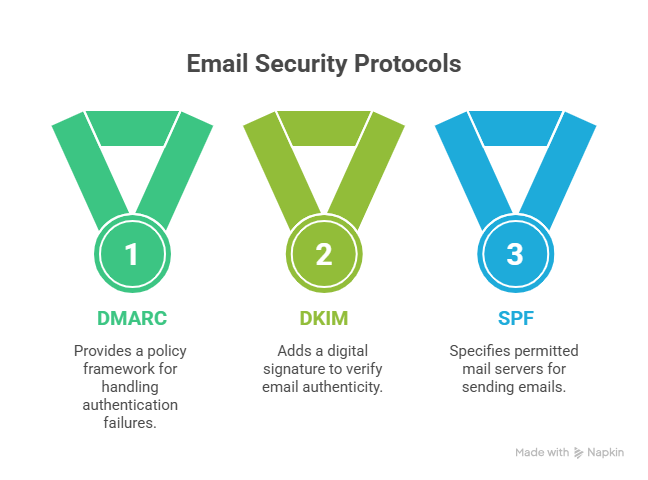
Before you scale cold outreach, your domain needs to prove it’s legitimate. That starts with SPF, DKIM, and DMARC.
Without these records configured correctly, inbox providers treat your emails as suspicious. No amount of warm-up or inbox rotation can compensate for failed authentication.
Here’s what each protocol does and what you need to check.
SPF: Authorize your sending tools
SPF tells inbox providers which servers are allowed to send email on behalf of your domain.
If your outreach tool isn’t included in your SPF record, your emails may fail authentication and land in spam.
Checklist:
- Maintain only one SPF record per domain
- Include every sending platform you use
- Update SPF when adding new tools
- Avoid exceeding DNS lookup limits
SPF is your first layer of trust. Keep it accurate and up to date.
Tip: Use our free SPF Generator to build your SPF record before increasing sending volume.
DKIM: Prove the message wasn’t altered
DKIM adds a cryptographic signature to each outgoing email. Receiving servers use this to verify the message hasn’t been tampered with and that it came from your domain.
Checklist:
- Generate a DKIM key from your email provider
- Publish the public key in your DNS
- Confirm your sending platform is actively signing emails
- Test headers to verify DKIM passes
DKIM builds integrity into every message you send.
DMARC: Set enforcement and visibility
DMARC ties SPF and DKIM together. It tells inbox providers what to do if authentication fails and sends you reports about those failures.
Checklist:
- Publish a DMARC record in DNS
- Start with monitoring mode to review reports
- Move to stricter policies once confident
- Monitor aggregate reports regularly
DMARC gives you visibility and control over how your domain is used.
Tip: Use our free DMARC Record Generator to set up monitoring correctly before tightening enforcement as you scale.
Why this matters for scaling
When you increase sending volume, inbox providers rely heavily on authentication signals. Failed SPF, missing DKIM, or a misconfigured DMARC policy will damage your reputation quickly.
Authentication isn’t optional. It is the technical foundation that allows warm-up, inbox rotation, and horizontal scaling to work safely.
Inbox rotation and data quality key points
Warming up one inbox isn’t enough when you scale. High volume from a single sender increases risk quickly. Inbox rotation and clean data help you distribute volume and protect your reputation.
Rotate inboxes to reduce concentration risk
Sending 500 emails per day from one inbox will trigger filtering. Instead, spread volume across multiple inboxes, ideally on separate domains or subdomains.
Best practices:
- Use multiple inboxes under secondary domains
- Warm up each inbox individually
- Cap daily sends per inbox at 30 to 50 for cold outreach
- Monitor open rates, bounce rates, and blacklist status per inbox
If one inbox starts underperforming, pause it before it affects the rest of your system.
Clean data protects deliverability
Even perfect infrastructure cannot compensate for bad lists. High bounce rates and low engagement damage domain reputation quickly.
Focus on:
- Verifying every email before sending
- Avoiding scraped or purchased lists
- Segmenting tightly by persona or trigger
- Suppressing unengaged contacts
As you scale, list quality becomes more important, not less.
Inbox rotation spreads risk. Clean data preserves reputation. Both are required for sustainable growth.
Mistakes that kill scaled campaigns
Scaling fails when teams increase volume without protecting reputation.
Here are the most common mistakes.
Sending too much, too fast
Sudden volume spikes from new or lightly used domains trigger spam filtering. Gradual ramp-up is required before increasing daily sends.
Ignoring domain health
Open rates don’t tell the full story. Monitor bounce rates, spam complaints, and blacklist status regularly. If bounce rates exceed 2 percent, stop and investigate.
Using identical copy across inboxes
Sending the same message from multiple domains creates detectable patterns. Vary subject lines, opening lines, and calls to action to reduce filtering risk.
Skipping inbox-level warm-up
Each inbox builds its own reputation. Adding a new sender to rotation without warming it first can hurt overall deliverability.
Scaling bad data
High bounce rates and low engagement damage domain reputation quickly. Verify emails before sending and suppress unengaged contacts.
Scaling works when volume, infrastructure, and data quality stay aligned. Ignore one of these and deliverability declines fast.
Conclusion
Scaling email outreach works when volume increases alongside infrastructure and reputation management.
Concentrating volume in one inbox increases risk. Spreading volume across multiple domains, warming every inbox, and monitoring domain health allows you to grow safely.
Before increasing volume:
- Authenticate every domain properly
- Warm up each inbox before launch
- Rotate senders instead of concentrating volume
- Track blacklist status and engagement weekly
Deliverability isn’t a one-time setup. It requires consistent monitoring and controlled growth.
If you’re planning to scale cold outreach, start by protecting your sender reputation. Warmup Inbox helps you warm new domains, monitor inbox health, and maintain trust signals while campaigns run.
FAQs
How many cold emails can I send per day safely?
There’s no universal number, but most cold outreach campaigns stay under 30 to 50 emails per inbox per day. Some experienced senders push 100 to 150, but only with properly warmed domains and strong engagement.
Do I need a separate domain for cold outreach?
It’s strongly recommended. Using a secondary domain protects your primary domain, which is tied to your website and customer communication. If your outreach domain gets flagged or blacklisted, your core business operations remain unaffected.
What is email warm-up and why do I need it?
Email warm-up is the process of gradually increasing sending volume while generating positive engagement signals like opens and replies. Inbox providers use these signals to determine whether your domain is trustworthy. Without warm-up, new inboxes look suspicious and are more likely to land in spam.
How long does it take to scale from 0 to 1,000 emails a day?
It depends on your infrastructure.
With multiple warmed domains and inboxes, teams typically scale over 3 to 6 weeks. The key is gradual ramp-up and consistent monitoring. Jumping to 1,000 emails per day too quickly can damage your domain and set you back even further.
What happens if I don’t use SPF or DKIM?
Without SPF and DKIM, inbox providers cannot properly verify your domain. Your emails are more likely to fail authentication and land in spam. At scale, missing authentication significantly increases rejection and filtering rates. Proper DNS configuration is required before launching high-volume campaigns.
Can I use my primary Google Workspace account for scaling?
It’s not recommended. Your primary domain is tied to customer communication, internal operations, and brand reputation. If scaled outreach damages that domain, recovery can be slow and disruptive. Use separate domains and inboxes for cold outreach instead.
How do I fix a bad domain reputation?
First, stop sending immediately to prevent further damage.
Then:
- Check blacklist status
- Review bounce and spam complaint rates
- Fix authentication issues
- Resume sending slowly with a structured warm-up process
Recovery takes time. Ongoing monitoring is critical to prevent repeat issues.
Does Warmup Inbox work with Outlook and Microsoft 365?
Yes. Warmup Inbox supports Google Workspace, Outlook, Microsoft 365, and other major providers. You can warm and monitor multiple inboxes across different platforms from one dashboard.