What Warmy does well
- Customer support: Support is the single most praised thing across Warmy's reviews.
- Deliverability tools: Seed lists, placement testing, Google Postmaster integration, reports, and email validation are available alongside warmup.
Warmy packs email warmup, placement testing, seed lists, email validation, and other deliverability tools into one product. But that wide toolkit comes at a considerably higher starting price, and Warmy doesn't include campaign sending.
We tested Warmy in depth and compared it with Warmup Inbox to see which features are actually worth paying for.
Warmy offers a wide deliverability toolkit, with features such as Google Postmaster integration, email validation, and Seedlist. Warmup Inbox puts more emphasis on the warmup itself, running a network of 30,000+ real inboxes that generate over 6 million real interactions a day. Customers who have run both tell us our warmup places 15 to 20% more mail.
It also starts at a lower price and includes campaign sending and a Unified Inbox.
Warmy is an email deliverability platform that includes automated email warmup, inbox placement testing, seed lists, email validation, reporting, and deliverability monitoring.
It supports mailboxes across the major providers, including Google Workspace, Microsoft 365, Gmail, Yahoo, and Outlook.
Warmy includes email warmup alongside several tools for checking and managing deliverability. We tested the main features to see what they offer and where they're most useful.

Warmy automatically opens and replies to warmup emails, marks them as important, moves messages out of spam, and clicks links. You can adjust sending volume and choose different warmup settings based on your sending needs.
Seed lists and inbox placement tests let you check where emails land across different providers. Placement testing uses credits and is available through the API, while Seedlist is priced separately from Warmy's warmup plans.
Our take: Seed lists are best for more specific testing scenarios and are priced separately from Warmy's warmup plans. Most senders won't need them for standard warmup.
Warmy connects with Google Postmaster Tools and brings domain reputation, DNS records, and other deliverability data into its dashboard. You can monitor domain health without checking each source separately.
Our take: Google Postmaster Tools is most useful once you're sending at least 5,000 emails per inbox each month, so it may be less relevant for lower-volume cold email campaigns.
Warmy lets you export deliverability reports as PDF or XLSX files. Email validation is also included, so you can check addresses before sending campaigns.
Warmup Inbox doesn't currently offer comparable report exports. However, email verification is built into Campaigns at no extra cost, so addresses can be checked before a campaign is sent. For standalone bulk list cleaning and validation, EmailListVerify is available separately.
Our take: Warmy offers more extensive functionality here, especially for those that need exportable reports or standalone validation tools. If you only need to verify addresses before sending a campaign through Warmup Inbox, that function is already included.
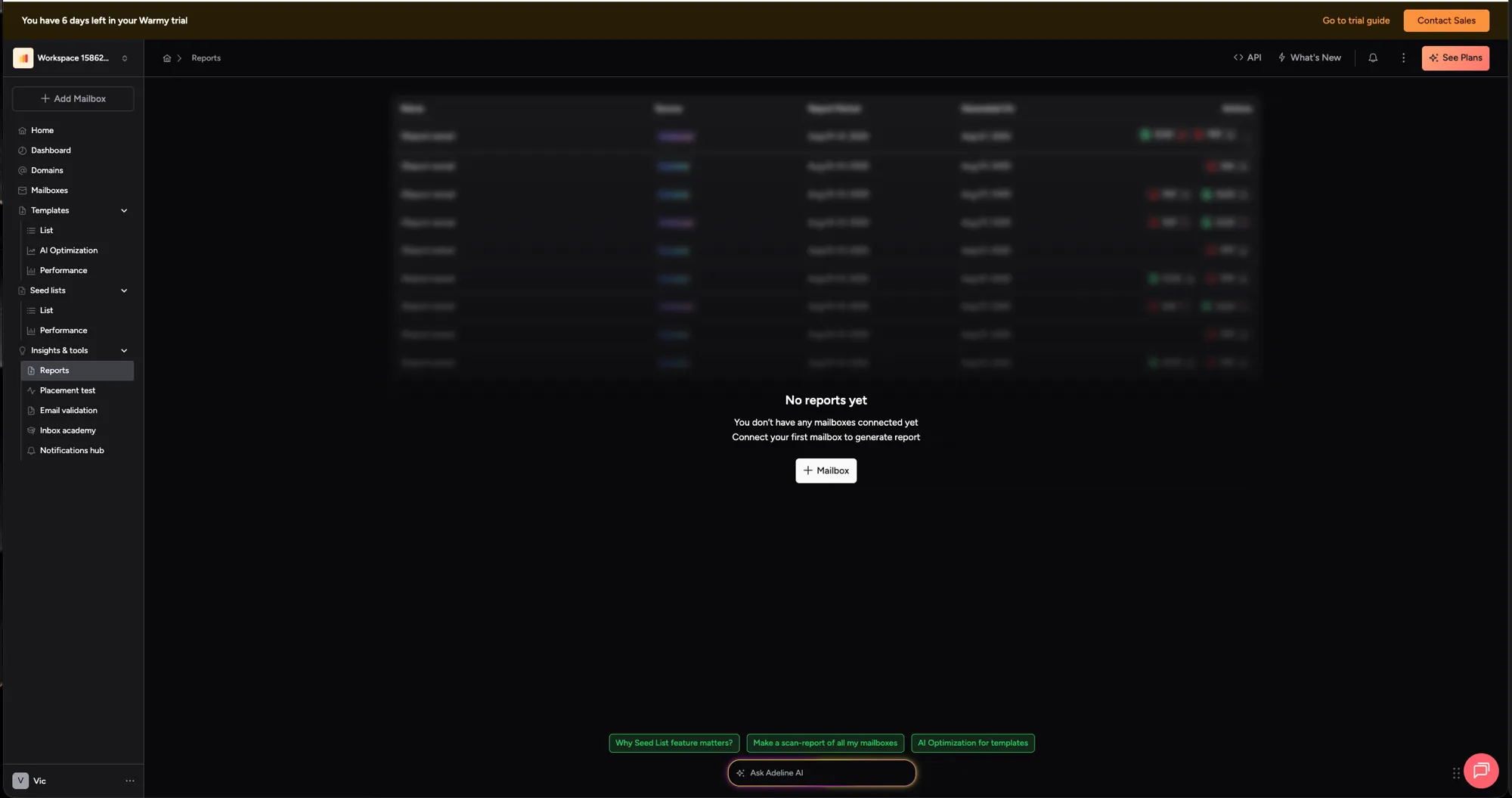
Warmy uses its Adeline AI system to adjust warmup activity automatically. There's also an Ask Adeline AI assistant for deliverability questions, while agency features include multiple workspaces and white-label reporting.
Our take: If you run many client accounts from one login and send them branded reports, Warmy is built for that today and we are not. It is also the most expensive way to buy warmup on this page, so the question is whether the workspace layer is worth the per-mailbox difference across your whole client base.
Warmy doesn't display prices on its public pricing page. To see the current rates, you need to start a trial or contact sales.
Inside our own trial on 1 July 2026 we recorded five Warm Up tiers, priced per mailbox and based on monthly warmup volume. These are the last Warmy rates we were able to capture, and they may have moved since:
Warmy pricing captured from inside a paid trial on 1 July 2026. Warmy does not publish these rates on its pricing page.
Two of those five tiers can only be bought annually, which the table shows as "Not available" under monthly billing.
Warmy's Seedlist product is priced separately, starting at $166 per month and increasing based on the number of seeds, providers, and senders.
Warmup Inbox starts at $15 per mailbox per month on annual billing, or $19 month to month. Both are published on our pricing page, and every plan is available either way.
Warmy's cheapest rates come with a condition attached. Starter at $41 and Business at $108 are sold on annual billing only. Switch the toggle to monthly and both tiers disappear, which leaves Premium at $189 per mailbox as the cheapest Warmy plan you can actually buy month to month.
On the rates we captured, Warmup Inbox Basic costs about 63% less per mailbox than Warmy Starter on annual billing. Month to month the gap is far wider, because Warmy's two cheapest tiers aren't sold that way at all.
Both figures above are for a single mailbox, and most teams aren't warming one. On Warmup Inbox the per-inbox price starts coming down from your second mailbox and keeps falling as you add more, so ten inboxes never costs ten times one.
Warmy may also come down as you add mailboxes, but it doesn't publish those rates. You'd need to start a trial or talk to their sales team to find out what you would actually pay.
Every Warmup Inbox price is on our pricing page. You can read it, buy it yourself, and cancel it yourself, without booking a call.
Warmy's public pricing page shows plan tiles and a Book a Demo button. Every rate above came from inside a trial, not from that page. Cancelling takes five business days' notice rather than a click.
What a vendor discounts to in a negotiation changes. What they publish doesn't.
Warmy has a solid set of deliverability tools, particularly for teams that need more than inbox warmup. Its main drawbacks are pricing and how that pricing works as you add mailboxes or extra features.
Across roughly 870 reviews on G2, Capterra and Trustpilot, Warmy is praised most often for support and for how quickly it sets up. The complaints cluster just as consistently, and they're worth knowing before you commit to an annual plan.
The most frequent complaint by a distance is per-mailbox cost once you're warming more than a handful of accounts. Reviewers do the arithmetic themselves in the review text, and it's the reason most of them give for leaving.
Warmy and Warmup Inbox both offer automated email warmup, but there are major differences in pricing, network, warmup controls, and additional deliverability tools.
Here's how they compare across the features most likely to affect your choice.
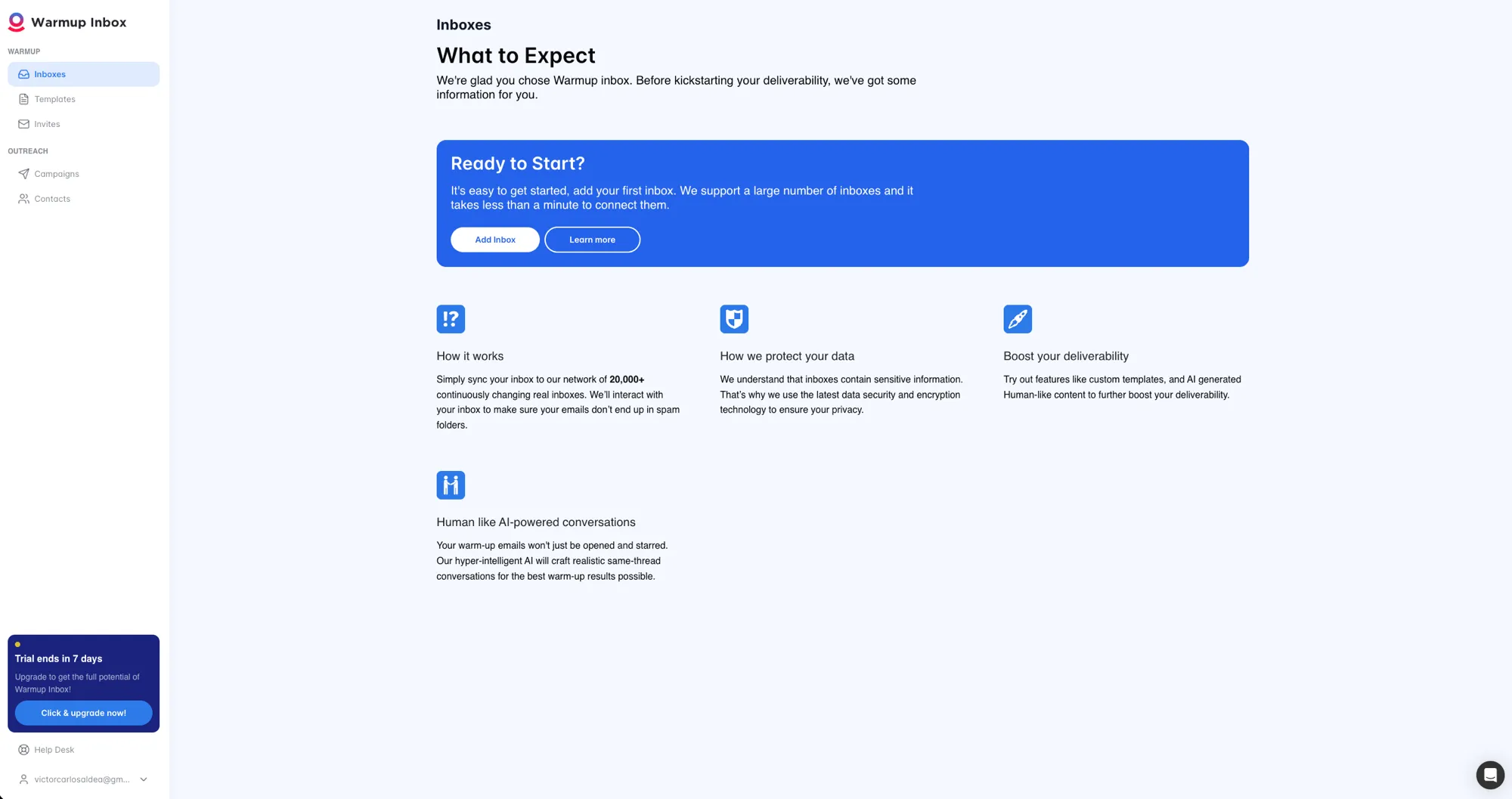
Warmy Starter costs $41 per mailbox per month with annual billing, compared with $15 for Warmup Inbox Basic. Warmy includes 100 warmup emails per day at this tier, while Warmup Inbox includes 75.
The difference is larger if you prefer monthly billing. Warmup Inbox Basic costs $19 per mailbox per month, while Warmy's Starter and Business tiers require annual billing. Its cheapest month-to-month option is Premium at $189 per mailbox.
Winner: Warmup Inbox for lower entry pricing and flexible billing.
Warmy's entry tier supports up to 100 warmup emails per day. Warmup Inbox Basic supports 75, rising to 250 on Pro and 1,000 on Max.
Those two numbers aren't like for like. Warmy's 100 sits on a $41 tier. Our 75 sits on a $15 tier, and our Pro tier gives you 250 a day for less than Warmy charges for 100.
Warmup Inbox also lets you set your starting volume, daily increase, and maximum sends rather than handing the ramp to an automation.
Winner: Warmup Inbox. More headroom per dollar, and you decide how it gets used.
Warmup Inbox caps how much of your warmup mail gets replied to: 25% on Basic, 45% on Pro, 50% on Max. The cap is deliberate. A mailbox that replies to everything it receives doesn't look like a mailbox a person uses, and providers can tell.
Our help center says so plainly: we don't offer 100% reply rates, because that pattern can cause problems. You can move the rate up or down inside the cap, so you control how conversational the mailbox looks.
Warmy doesn't publish a reply-rate figure, or a position on why the number matters.
Winner: Warmup Inbox. A published limit with the reasoning attached beats a number nobody will show you.
Warmup Inbox runs a network of more than 30,000 real inboxes producing over 6 million real interactions every day. These are working mailboxes belonging to real people, on the providers your prospects actually use. Customers who have run both tools tell us our warmup places 15 to 20% more mail, and that this is why they switched.
Warmy automates the same categories of engagement, including opens, replies, spam rescue, and link clicks. It doesn't publish how its network is composed or where those mailboxes come from.
A warmup network is only as good as what's inside it, and what those inboxes actually do. Ours open and read your mail, reply to it in a real exchange, mark it as important, and pull it out of spam through a six-step rescue. You set the ramp yourself with a starting baseline, a daily increase, and a ceiling, so the mailbox grows into its normal traffic instead of being switched on at full speed.
That pattern is the part providers are grading. Volume on its own doesn't build a reputation. Activity that reads like a person using their mailbox does, which is also why we cap reply rates rather than maximising them.
Winner: Warmup Inbox. 30,000+ real inboxes generating 6M+ real interactions a day, behaving the way a person's mailbox behaves.
Warmy lets you choose warmup topics and languages, add your own templates, and select preferred email providers. Its automation gradually increases sending volume and handles engagement such as replies, marking messages as important, and moving emails out of spam.
Warmup Inbox offers custom topics, languages, templates, ESP targeting, scheduling, and custom warmup settings depending on your plan. You can also control your starting volume, daily increase, and maximum daily sends.
Winner: Tie. Both offer plenty of control over warmup, although the available settings and plan requirements differ.
Both products automatically move warmup emails out of spam as part of the warmup process.
Warmup Inbox uses a six-step spam rescue process: mark the message as read, flag it as important, reply, move it to the primary inbox, wait one to two minutes, and then move it to the Warmup Inbox folder.
Warmy also rescues warmup emails from spam, although its warmup emails stay in the primary inbox instead of being moved to a separate warmup folder.
Winner: Tie. Both actively rescue warmup emails from spam, with a different approach to where those messages are stored.
Warmy has more additional deliverability tools. It includes Google Postmaster integration and deliverability monitoring, while Seedlist, placement testing, email validation, and exportable reports are also available.
Warmup Inbox has warmup statistics and tools for monitoring inbox health, but doesn't currently offer native Google Postmaster integration or the same range of placement testing and reporting features.
Winner: Warmy if you want more deliverability tools alongside warmup.
Warmy has a strong support reputation, including a 9.7/10 support score on G2.
Warmup Inbox scores 4.7 on Trustpilot, the one review platform in this category that isn't fed by vendor invitations. Support comes up repeatedly in those reviews, usually for replying within hours.
Winner: Tie. Both are well reviewed on support, on different platforms.
Warmy's site claims 2.3x open rates, 3x clicks, a 35% drop in bounces and a 22.5% lift in conversion. None of those figures arrives with a method, a sample size, or a customer who will put their name to it.
Warmup Inbox publishes eight customer case studies, with named companies and the numbers behind them. They're all at warmupinbox.com/customers.
Customers who have run both tools tell us our warmup places 15 to 20% more mail. We can't name those accounts and we're not going to pretend otherwise. What we can point you at is eight companies who were willing to be named.
Warmy makes sense when you need several deliverability tools under one roof. But if email warmup is your main priority, many of those additional features can mean paying more for functionality you don't use.
Warmup Inbox starts at $15 per mailbox per month with annual billing, with monthly billing available on every plan. The per-inbox rate falls as you add mailboxes, starting from the second one, with the largest discounts at higher volumes.
Warmup runs through a network of more than 30,000 real inboxes generating over 6 million interactions a day, with controls for sending volume, ramp speed, topics, languages, and other settings available depending on your plan.
There's no need to buy Warmy's separate Seedlist product to use Warmup Inbox's core warmup features, and you can choose monthly or annual billing.
"I've been using WarmupInbox.com to warmup all of our company emails and it works great and is the most affordable option that I've found. Support is great and responds quickly if you ever have any issues or need help."
"A great UI comparing with the price and how the system works makes it the best warm-up tool I've ever used."
"Really like Warmup Inbox. Easy to use, great deliverability and great after sales service."
Warmup Inbox won't be the better choice for every sender. Warmy makes more sense when you need its wide set of deliverability tools, or manage multiple clients through an agency workspace.
If email warmup is what you actually need, Warmup Inbox offers it alongside campaign sending and a unified inbox, without paying for Warmy's wide deliverability toolkit.
Warmy is a good choice if you need email warmup alongside placement testing, Google Postmaster integration, email validation, and other deliverability tools. You'll pay more for that larger toolkit, particularly if you're warming multiple mailboxes.
Warmup Inbox gives you more of the outreach workflow in one place. You can warm your inboxes, send campaigns, and manage replies through the Unified Inbox, with plans starting at $15 per mailbox per month and a per-inbox rate that comes down as you add mailboxes.
Start 7-day free trialWarmy is considerably more expensive than Warmup Inbox, and many senders won't get enough value from its additional deliverability tools to justify the difference. Features such as Google Postmaster integration and Seedlist are aimed at more specific use cases, while Warmy also lacks built-in campaign sending. If your priority is warming your inboxes and running outreach campaigns, Warmup Inbox gives you more of what you'll actually use at a lower starting price.
Warmup Inbox is built around the warmup itself, using a network of more than 30,000 real inboxes that generate over 6 million real interactions a day. Plans start at $15 per mailbox per month with annual billing or $19 with monthly billing, and include a 7-day free trial with no credit card required.
Warmy automates warmup activity such as sending, replies, spam rescue, and other engagement signals. Deliverability also depends on factors including domain reputation, authentication, sending practices, list quality, and campaign content.
Based on the pricing captured during our August 2026 research, Warmup Inbox Basic costs $15 per mailbox per month with annual billing, compared with $41 for Warmy Starter. That makes Warmup Inbox about 63% cheaper at the entry level. The difference can change at larger volumes because Warmy may offer lower per-mailbox rates as you add accounts. Those discounts aren't shown publicly, so you'll need to sign up or contact Warmy for current pricing at scale.
Warmup Inbox lets you control the starting volume and ramp settings for a mailbox, so an already-warmed account doesn't have to use the same settings as a brand-new mailbox.
Last updated August 2026. Pricing and features can change. We review this comparison regularly and recommend checking each provider's current pricing before making a purchase.
7-day free trial. No credit card. Cancel anytime.