Folderly's key features
Here's what you get and how each feature compares with what Warmup Inbox offers.
Source
Daily Upkeep
Daily Upkeep is the closest current Folderly equivalent to email warmup.
Folderly's documentation confirms automated sending and engagement designed to build positive signals for your mailbox, domain, and IP. However, it doesn't publish the network size or offer documented controls for starting volume, daily increases, or maximum sends.
Our take: The automated activity itself isn't the issue here. The bigger difference is visibility. With Warmup Inbox, warmup is an explicit product feature with controls over how sending ramps. Folderly handles this activity in the background without publishing the same level of detail.
Deliverability monitoring
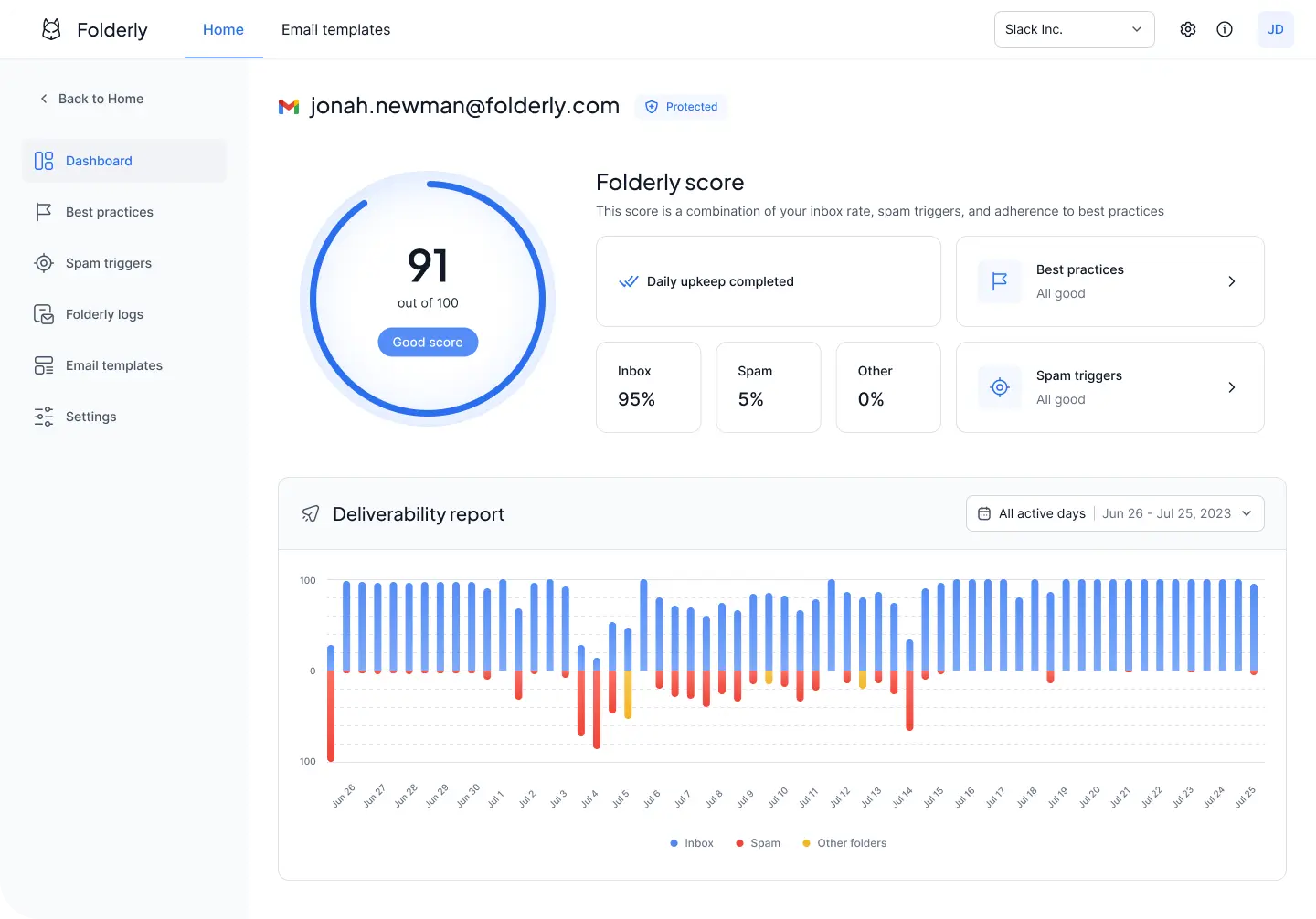
Folderly monitors where emails land and tracks inbox, spam, and other-folder rates over time. Its Folderly Score gives you a high-level view of sender reputation, while alerts flag changes that could affect deliverability.
This is separate from Inbox Insights, which lets you run individual placement tests before sending a campaign.
Our take: Both products go beyond simply sending warmup emails. Folderly puts more of its diagnostic tools inside the core dashboard, while Warmup Inbox combines ongoing deliverability monitoring with warmup and offers additional diagnostic tests as free tools.
Inbox Insights
Inbox Insights is Folderly's separate placement-testing product. The free tier includes two tests per month, while the paid plan costs $79 per month or $799 annually for up to 100 tests per month.
That’s different from the placement monitoring included with Folderly's core plan. Monitoring tracks performance over time, while Inbox Insights lets you test a particular email on demand.
Our take: Two free tests per month may be enough for occasional checks, but regular placement testing adds another subscription on top of an already expensive Folderly plan. Warmup Inbox includes ongoing placement tracking and a free placement test, so you can monitor where emails are landing without paying for a separate testing product.
Spam-trigger and authentication checks
Folderly checks email content and templates for potential spam triggers and analyzes SPF, DKIM, DMARC, and other domain settings. These checks are integrated into the main dashboard, alongside guidance for addressing issues it detects.
Our take: Folderly brings its diagnostics and guided fixes together inside the paid product, while Warmup Inbox provides many of the same checks through free standalone tools. Folderly's advantage is integration, not access to an entirely different set of deliverability checks.
Pulse and EmailGen AI
Folderly's core plan already includes real-time spam-placement alerts. Pulse provides similar alerting as a standalone free product, with notifications available through email, Slack, and SMS.
EmailGen AI is another separate product for generating cold email copy and checking it for deliverability issues before sending.
Our take: Neither gives Folderly much of an advantage over Warmup Inbox. Warmup Inbox already monitors inbox placement and deliverability as part of the product, while its AI Email Writer is available for free. Pulse is more useful as a standalone free tool if you want alerts without subscribing to Folderly's core plan.