How to track email open rates in 2025
Most email tracking relies on a tiny, invisible image called a tracking pixel. When the email is opened, the pixel loads, and the sender gets a signal. In theory, it’s an easy way to know if your message was read. In practice, it’s far from accurate.
Why? Two main reasons:
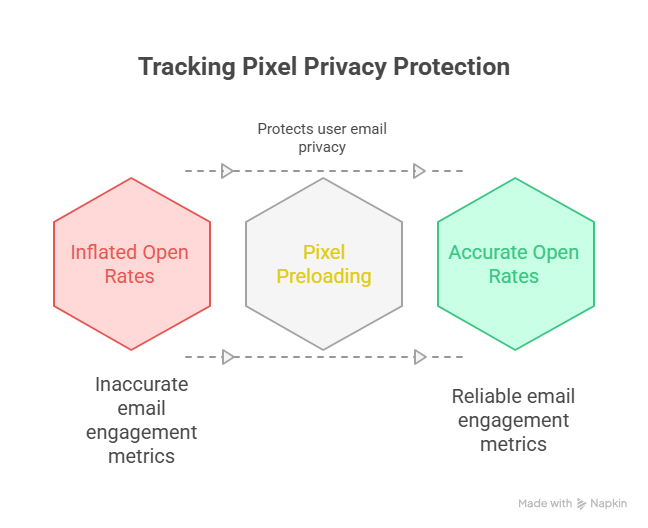
- Apple’s Mail Privacy Protection (MPP): Apple Mail now pre-loads all images on its own servers. That means your tracking pixel fires whether or not the recipient ever opened your email. The result: inflated open rates that make it look like everyone’s reading, even when they’re not.
- Gmail’s Image Proxy: Gmail routes images through its own proxy servers. Sometimes this blocks pixels from unknown senders, leading to undercounted opens. You might think no one saw your email when, in fact, they did.
The Bottom Line
Open rates are no longer a precise metric. At best, they give you a vague signal of activity. If you’re still relying on them as your main measure of success, you’re flying blind.
Comparing the methods: Which tracking approach is right for you?
When you’re running outbound email campaigns, tracking performance is non-negotiable. But how you track—whether through open rates, click tracking, reply detection, or more advanced methods—can impact both your deliverability and your decision-making.
Some tracking methods give you cleaner data but come with deliverability risks. Others protect your sender reputation but offer limited visibility.
| Method | How it works | Reliability | Privacy impact | Best for |
|---|---|---|---|---|
| Read receipts | Recipient’s email client asks if they’ll send back a notification | Low | High (transparent, user-controlled) | Internal comms, urgent 1:1 messages |
| Tracking tools (pixel) | Embeds a hidden 1×1 image that “calls home” when loaded | Medium-low | Low (invisible to recipient) | Sales and marketing teams that just need a rough signal |
| Link tracking | Redirects links through a tracking domain before sending to final destination | High | Medium (visible redirects) | Measuring engagement in sales funnels and campaigns |
| Secure email platforms | Requires recipient to log in to a secure portal to view the message | Very high | High (explicit, user must interact) | Legal, HR, and financial communications where proof is critical |
Method 1: The old-school read receipt (& when to use it)
Read receipts have been around since the early days of email, but they’ve always been a bit of a blunt instrument. They tell you whether someone opened your message…sometimes. But in the context of cold outreach, especially at scale, read receipts can do more harm than good if used carelessly.
This method still has its place, but it’s not for every sender or every campaign, nor is it available on free/personal Gmail accounts.
How read receipts actually work
Read receipts rely on two mechanisms: return receipts and tracking pixels.
- Return receipts (also called MDNs, or Message Disposition Notifications) are a built-in feature of some email clients. When you request one, the recipient’s email client may send a notification when the message is opened. But this only works if the recipient agrees to send it, and many clients disable it by default.
- Tracking pixels are tiny, invisible images embedded in the email. When the recipient loads the message, the image loads from a server, signaling an open. This is how most modern email tracking tools work.
The problem? Both methods are unreliable. Many email clients block images by default, and privacy-focused tools (like Apple Mail Privacy Protection) obscure open data entirely. So even if you request a read receipt or use tracking, there’s no guarantee you’ll get accurate feedback.
When read receipts can help
Despite the limitations, there are a few narrow use cases where read receipts still offer value:
- High-stakes, low-volume outreach: If you’re sending a small number of personalized emails, say, to a shortlist of investors or strategic partners, a read receipt can help you time your follow-up.
- Internal communication or client check-ins: In some B2B workflows, knowing whether a key stakeholder opened your message can help move a project forward.
- Testing deliverability manually: If you’re troubleshooting inbox placement, sending a tracked test email to a known recipient can help confirm whether it landed in the inbox or spam.
Risks and downsides to consider
- They can hurt deliverability: Some spam filters flag messages with tracking pixels or read receipt requests as promotional or suspicious.
- They can feel intrusive: Even if recipients don’t see the tracking, privacy-conscious buyers may be using tools that detect it.
- They don’t tell the full story: An open doesn’t mean interest. Someone might open your email by accident or just to clear their inbox.
How to use read receipts on Outlook
Outlook makes it fairly straightforward to request read receipts, though it’s worth noting that recipients can still decline them.
Per email (Outlook desktop app):
- Open a new email.
- Go to the Options tab in the ribbon.
- Under Tracking, tick Request a Read Receipt (and/or Delivery Receipt).
- Send your message.
Default for all messages:
- Go to File → Options → Mail.
- Scroll to Tracking.
- Under “For all messages sent, request:” check Read receipt (and/or Delivery receipt).
- Click OK.
Watch it in action: Request Read or Delivery Receipt From Microsoft Outlook (YouTube)
How to use read receipts on Google Workspace (Gmail)
Read receipts are only available in Google Workspace (paid) accounts, not regular @gmail.com addresses. They also must be enabled by your Workspace admin before you can request them.
Step 1: Make sure your admin has enabled read receipts:
Admins can turn this on under: Admin console → Apps → Google Workspace → Gmail → User settings → Email read receipts.
Step 2: Request a read receipt as a user:
- In Gmail, click Compose.
- Write your message as normal.
- At the bottom right, click More options (three dots).
- Select Request read receipt.
- Send your message.
⚠️ Important: Recipients can still block or ignore receipts, and some email apps (like Apple Mail) never return them.
Watch it in action: How to Turn On Gmail Read Receipts in Google Workspace (YouTube)
Method 2: Email tracking tools (the most common approach)
Most teams rely on email tracking tools to monitor deliverability, engagement, and campaign performance. These tools are popular because they’re easy to integrate and give quick feedback on whether your emails are landing, getting opened, or ignored.
What email tracking tools actually measure
Most email tracking tools focus on three main metrics:
- Delivery rate: Was the email accepted by the recipient’s server?
- Open rate: Did the recipient open the email?
- Click rate: Whether the recipient clicked a link in the email.
Here’s the catch: These tools don’t tell you why deliverability is suffering. They also don’t detect soft failures like emails landing in the Promotions tab or being silently filtered into spam without a bounce.
The hidden risks of pixel-based tracking
Most tracking tools rely on invisible images (tracking pixels) to detect opens. However, this method has serious blind spots:
- Apple Mail Privacy Protection (AMPP) preloads images on behalf of users, inflating open rates.
- Corporate firewalls may block images entirely, underreporting opens.
- Some inbox providers treat pixel tracking as a spam signal, especially if you’re sending cold emails.
How to use tracking tools without misreading the data
Email tracking tools still have a place in your stack, but you need to combine them with other signals and context. These are a few ways to get more accurate insights:
- Pair tracking with inbox placement testing.
- Monitor bounce types: A high rate of soft bounces could mean a reputation issue.
- Track replies, not just opens.
- Use consistent sending patterns.
If you want to try pixel-based tracking, here are a few reputable options:
- Mailtrack (Gmail): Lightweight Chrome extension.
- Streak (Gmail): CRM inside Gmail with built-in tracking.
- Mixmax (Gmail/Google Workspace): Advanced scheduling, templates, and tracking.
- SalesHandy (Gmail & Outlook): Team dashboards and mail merge features.
- Yesware (Outlook & Gmail): Popular with sales teams; includes Salesforce integration.
Important Caveat
All of these tools rely on tracking pixels. Because of Apple Mail Privacy Protection and Gmail’s proxy servers, expect inflated or incomplete open data. Use these tools more for directional signals than hard metrics.
Method 3: Link tracking (a more reliable engagement signal)
As we’ve said, opens used to be the go-to metric, but that signal is no longer reliable. Link tracking, on the other hand, gives you a stronger and more consistent signal of real engagement. When someone clicks a link in your email, it’s a clear sign they saw your message, found it relevant, and took action.
Best practices for using tracked links
- Use branded tracking domains: Avoid generic tracking links. Set up a custom domain like
click.yourcompany.com. - Limit the number of links: One or two links per email is enough.
- Avoid link shorteners: Public shorteners like bit.ly can be flagged.
- Make your links relevant: Use links that offer value, like a calendar booking page or relevant resource.
Method 4: Secure email platforms (for guaranteed confirmation)
Sometimes “maybe” isn’t good enough. If you’re sending a contract, financial document, or anything sensitive, you need rock-solid proof that the message was opened. Secure email platforms require the recipient to log in to a secure portal before viewing your message, providing verifiable confirmation.
When to use secure platforms vs. traditional sending
Use secure email platforms when:
- You need confirmation of delivery and open (legal documents, contracts, etc.).
- You’re sending to regulated industries like healthcare or finance.
- Your domain has had past deliverability issues.
Avoid them for cold outreach sequences, marketing campaigns, and transactional emails like password resets or receipts.
If open rates are dead, what should you track instead?
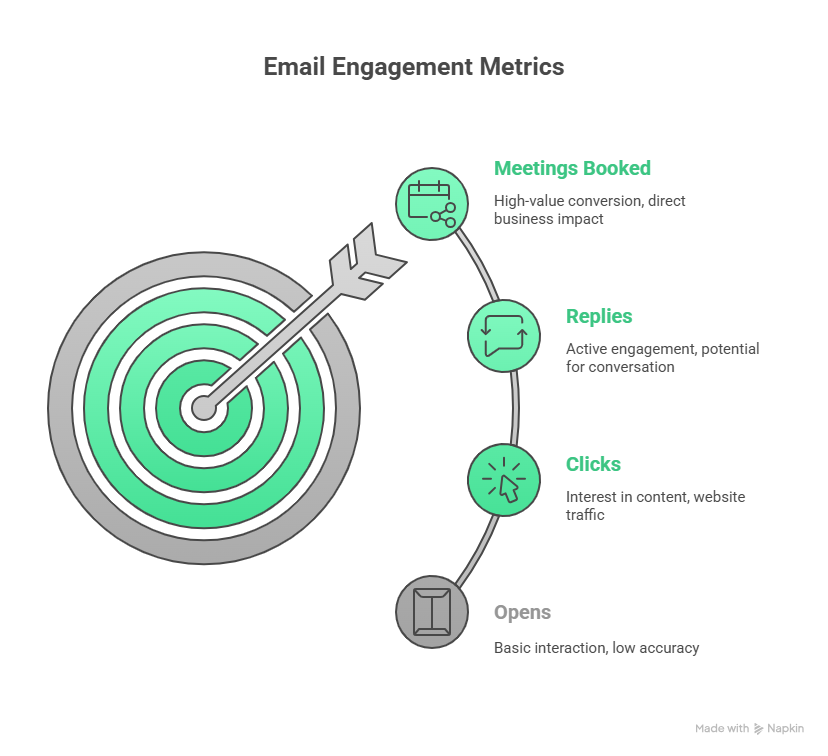
The good news? Opens were never the metric that really mattered. What drives results are the actions that come after.
Focus on reply rates and positive engagement
Reply rate is one of the strongest signals of real engagement. Unlike opens, replies can’t be spoofed by privacy filters. In outbound campaigns, aim for a 5–10% positive reply rate. If you’re below 3%, it’s time to check your targeting or messaging.
Track clicks as proof of intent
A click is hard to fake and easy to measure. Frame your CTA around a link action: “View the proposal,” “Book a meeting,” or “See the portfolio.”
Measure meetings booked
For sales teams, meetings are the metric that matters most. Use tools like Calendly or HubSpot to log bookings directly from your outreach emails. Treat every booked meeting as the “north star” metric for cold outreach.
Watch unsubscribe rates
Unsubscribes don’t feel good, but they’re useful. A healthy unsubscribe rate is under 0.5% per campaign. Make unsubscribes visible and easy—it’s far better for someone to opt out than to mark you as spam.
Key Takeaway
Stop chasing open rates. If you want a true read on performance, track replies, clicks, meetings booked, and unsubscribes. These metrics reflect both user intent and sender reputation, and they’re the ones that will actually help you improve.
The ethics and legality of email tracking
Email tracking is common, but it also raises questions about privacy and compliance, especially when operating across multiple regions with different laws like GDPR.
Legal frameworks you need to understand
- GDPR (European Union): Tracking email opens or clicks without specific, informed, and unambiguous consent may be considered a violation.
- CAN-SPAM (United States): Doesn’t prohibit tracking, but requires clear sender identification, a valid physical address, and an easy opt-out mechanism.
- CASL (Canada): Requires express or implied consent before sending commercial emails. Tracking without consent can be seen as a violation.
Conclusion
Tracking whether your email was read is no longer straightforward. Open rates are fuzzy at best, but that does not mean you are flying blind. The real signals—replies, clicks, meetings booked, and even unsubscribes—give you a far clearer picture of what is working. If you shift your focus to those metrics and use tools that help protect your domain reputation, you will spend less time guessing and more time building real conversations.
FAQ
Can a recipient know I am tracking them?
With read receipts, yes. With tracking pixels, it is very difficult for the average user to notice, although some browser extensions can block them.
Is email tracking legal?
In most cases for commercial email, yes. You must still comply with privacy laws such as GDPR and CAN-SPAM, which require a clear way to opt out.
How can you tell if someone read your email on an iPhone?
You cannot reliably. Because of Apple Mail Privacy Protection, most emails sent to iPhone users through the Mail app will appear as opened even if they were not.
What is the most accurate way to know if an email was seen?
The most accurate signals are a direct reply or a link click. For guaranteed proof of receipt for sensitive documents, a secure email platform is the best choice.
Do read receipts work if the email goes to spam?
No. The email must be opened from the inbox for a read receipt request to be triggered.