
ivmURI Blacklist: How to Check & Remove Your Domain
If your sending IP has a clean reputation but your emails are still being filtered, check the domains and links inside your messages. The problem may not be your sending IP at all.
ivmURI is part of the Invaluement anti-spam service. Unlike an IP blocklist, it identifies domains and URLs found within the clickable links of spam messages. That means a domain in your email can cause filtering problems even when the server sending the message has a clean reputation.
Here’s how ivmURI works, how it differs from Invaluement’s IP lists, and what to do if your domain appears on it.
What is the ivmURI blacklist?
ivmURI is one of three DNS-based anti-spam lists operated by Invaluement. The service is meant to work alongside existing spam filters and identify unwanted messages that may escape other filtering systems.
Invaluement operates three main lists:
| List | What it identifies |
| ivmURI | Domains and hostnames found in clickable links within spam, plus a small number of IP addresses |
| ivmSIP | Sending IP addresses associated with high levels of spam |
| ivmSIP/24 | IP ranges associated with patterns of spam sending |
Each list points to a different problem. ivmSIP tells you about the infrastructure sending the message. ivmURI tells you about what’s linked inside the message.
Changing your sending IP therefore won’t resolve an ivmURI listing if you continue linking to the affected domain.
In August 2026, Invaluement renamed the list ivmLinkingDomains, so you may see either name in bounce messages and lookup tools. Invaluement’s own website still uses ivmURI.
Am I listed on any email blacklists?
If you are experiencing delivery issues, the first step is to check your reputation. Use our free tool below to check your status instantly.
⚡ Free email blacklist checker
Check your Domain or IP against 100+ Real-Time Servers
Why can ivmURI affect mail from a clean IP?
Because ivmURI looks at what you link to, not which IP sent the message, an email can run into filtering problems even when its sending infrastructure has a good reputation.
It isn’t necessarily your main domain that’s responsible. Emails can contain several other domains, including those used for landing pages, images, redirects, and click tracking. If one of those appears on ivmURI, it can contribute to the message being filtered.
This can be particularly confusing when a third-party or shared tracking domain is involved. The affected domain may belong to your email provider or another service rather than your business, so changing settings on your own sending domain won’t address it.
When investigating an ivmURI result, check the domains throughout the entire message instead of assuming your sending IP is the problem.
Why do domains get listed on ivmURI?
Invaluement uses ivmURI to identify domains and URLs that appear in the clickable links of spam messages. A listing therefore indicates a reputation problem associated with a domain appearing in message content.
If the domain belongs to you, investigate whether your website or email accounts have been compromised and whether the domain has been used in unsolicited campaigns. Check for unauthorized pages, redirects, or other changes to your website.
Your sending practices are worth reviewing too. Poor list hygiene, unsolicited email, and continuing to send to recipients who don’t engage can all contribute to broader reputation problems.
If the affected domain belongs to a third party, such as a tracking or redirect service, you may need to contact that provider instead. You can’t clean up or request removal for infrastructure you don’t control.
How to check if you’re listed on ivmURI
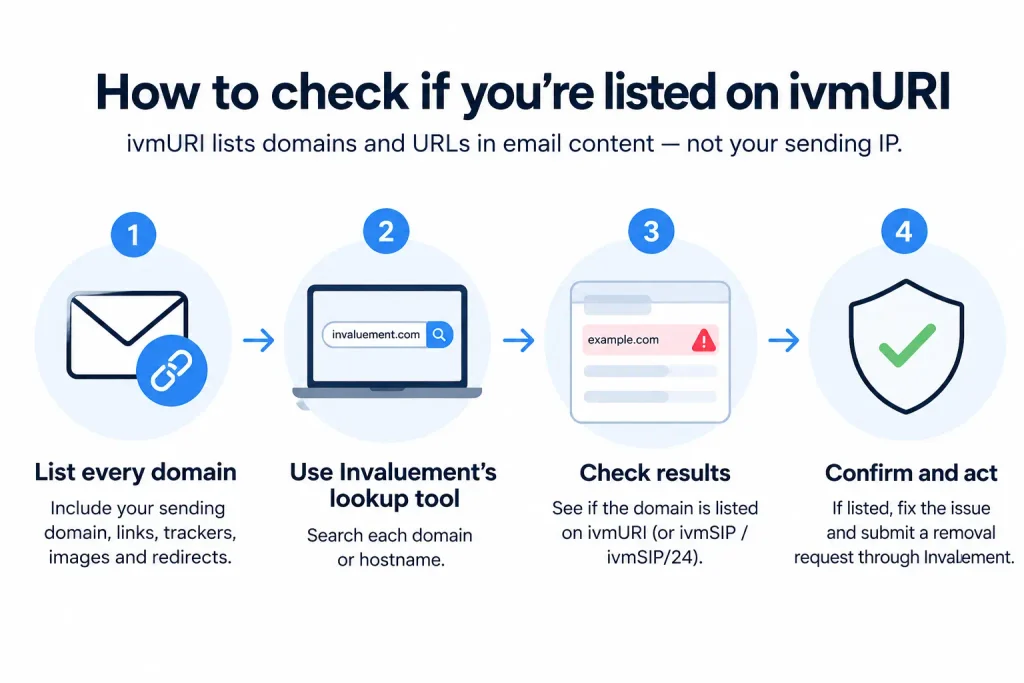
Use Invaluement’s official lookup service to research the domain. If you’re troubleshooting a particular email, check every domain that appears in it, including your website, landing pages, image hosts, tracking domains, and redirect domains.
Don’t stop after checking the sending IP. An ivmURI listing concerns domains or URLs within the message, so a clean IP lookup doesn’t rule it out.
Then, when you’ve identified the listed domain, you can determine whether it’s something you control and move on to the appropriate fix.
How to remove your domain from ivmURI
Begin by fixing the problem behind the listing. If the domain belongs to you, check for compromised accounts, malicious or unexpected website content, redirects, and unauthorized sending. Review your mailing practices as well and stop any activity that could continue generating spam reports.
Once you’ve addressed the cause, use Invaluement’s lookup and removal process to request delisting. Search for the affected domain or hostname and follow the instructions provided for submitting the request.
After you search for the domain, Invaluement shows delisting instructions that ask you to send a request by email. Send it from a business address, because Invaluement may ignore requests from free mailbox providers like Gmail or Yahoo.
Removal is free, but requests are reviewed manually. Give Invaluement accurate information about the domain and any changes you’ve made without submitting repeated requests before the underlying problem has been addressed.
If the listed domain belongs to your email provider, tracking service, or another third party, contact that provider. The owner of the affected infrastructure needs to resolve the listing.
How to stay off ivmURI
Pay attention to every domain that appears in your email, not only the domain in your From address. Landing pages, tracking links, redirects, image hosts, and other linked domains can all introduce reputation problems.
For domains you control:
- Keep websites and other software patched and monitor them for compromise.
- Protect email and administrative accounts with strong authentication.
- Send only to recipients who expect your messages.
- Remove invalid and long-inactive addresses from your lists.
- Review third-party services that can send email or create links on your behalf.
- Avoid unnecessary shared link shorteners and tracking domains when you have a better-controlled alternative.
SPF, DKIM, and DMARC are still important for protecting your sending identity, but passing authentication doesn’t prevent a domain in your message from appearing on ivmURI. Domain and link reputation need monitoring alongside your sending infrastructure.
Frequently Asked Questions
Is ivmURI an IP or domain blacklist?
ivmURI is primarily a domain and URI blocklist. It identifies domains and URLs found within clickable links in spam messages. Invaluement’s ivmSIP list, by comparison, is designed to identify sending IP addresses associated with spam.Why is my email being filtered if my IP is clean?
A receiving system can check both the infrastructure that sent an email and the domains linked inside it. If a domain in your message appears on ivmURI, it can contribute to filtering even when your sending IP has a good reputation.How is ivmURI different from ivmSIP?
ivmURI looks at links within email content, while ivmSIP looks at sending IP addresses. If you’re listed on ivmURI, changing your sending IP won’t resolve the domain reputation problem.Does Invaluement charge for ivmURI removal?
No. Invaluement doesn’t charge a fee for removal requests. You should investigate and address the reason for the listing before requesting delisting.Will Invaluement notify me if my domain is listed?
Don’t rely on receiving a notification. If you’re troubleshooting unexplained filtering, use Invaluement’s lookup service and check the domains appearing throughout the affected messages.


