Cold email sequences that run while your inbox keeps warming.
Scale the outreach without burning the reputation you built to make it work. Nothing gets paused or throttled to make room for the campaign, so the domain is still in good standing by the time the sequence finishes.
Warmup and campaigns share the same plumbing
Not two products sharing a login. The same mailboxes, the same network, and the same sending path underneath both.
No campaign sends from a cold mailbox
A campaign can only send from an inbox that is actively warming, and it goes out through the same path the warmup uses: your credentials, your provider, your From address. Not a parallel sending stack that happens to live in the same app.
Your campaign copy joins the warmup
Switch on content warmup and the first email of the sequence becomes warmup content on those same inboxes, from the moment you create the campaign. It stays in sync: edit the email and the warmed version updates, add a sender and it starts warming there too.
The warmup never slows down for it
Warming your campaign copy changes which content the network circulates, not how much. Your warmup volume is untouched, so reputation keeps building at full rate the whole time the campaign is running.
The whole outreach stack, built on a warmup network
Your pitch is already trusted before the first lead opens it
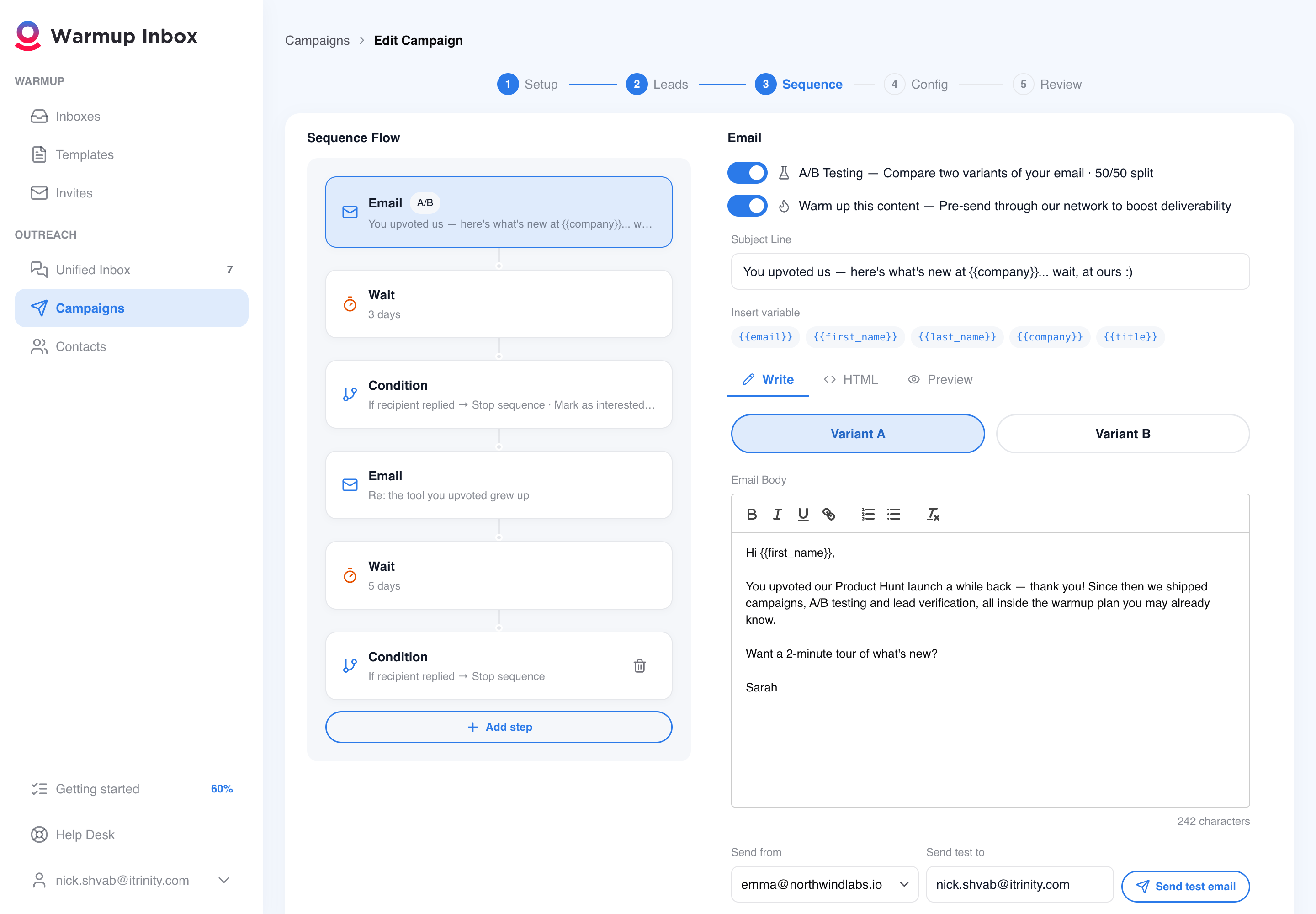
You launch with a reputation built for that exact message, not for generic filler. Here's how it's delivered: before your campaign starts, its real subject line and body circulate through 30,000+ real inboxes — opened, read, replied to — so mailbox providers see engagement before your prospects do.
- You do nothing — one toggle, on by default
- Both of your A/B variants get warmed; the winner keeps warming
- Your {{variables}} are filled with realistic samples, never raw placeholders
Start from a proven campaign, not a blank page
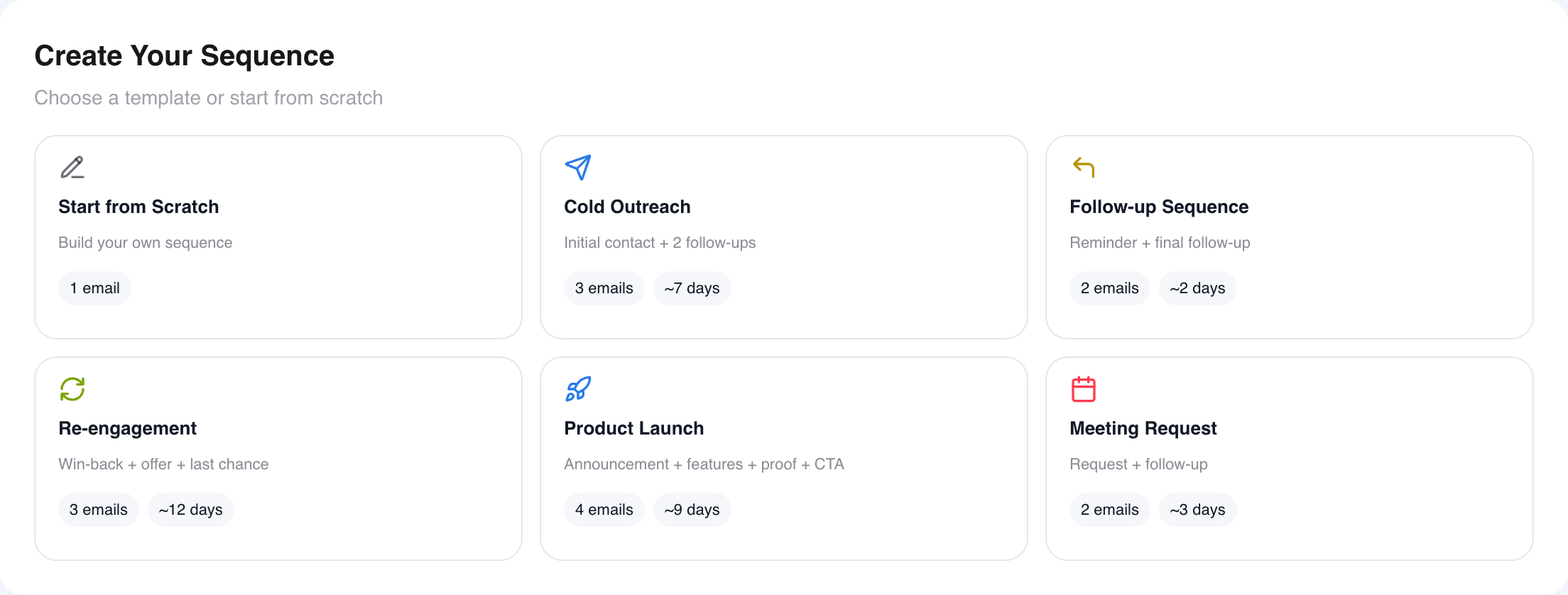
You're launch-ready in minutes: pick a proven multi-touch sequence from the gallery and it adapts itself to your list, using only the personalization fields your contacts actually have. Then fine-tune it on a visual canvas of emails, waits and reply conditions.
- Ready-made cold outreach sequences, one click to load
- Stop the sequence automatically when someone replies
- Mark interested leads and get an email alert the moment they answer
- Personalize with your list's own columns, previewed on a real contact
You learn which message doubles your replies — mid-flight
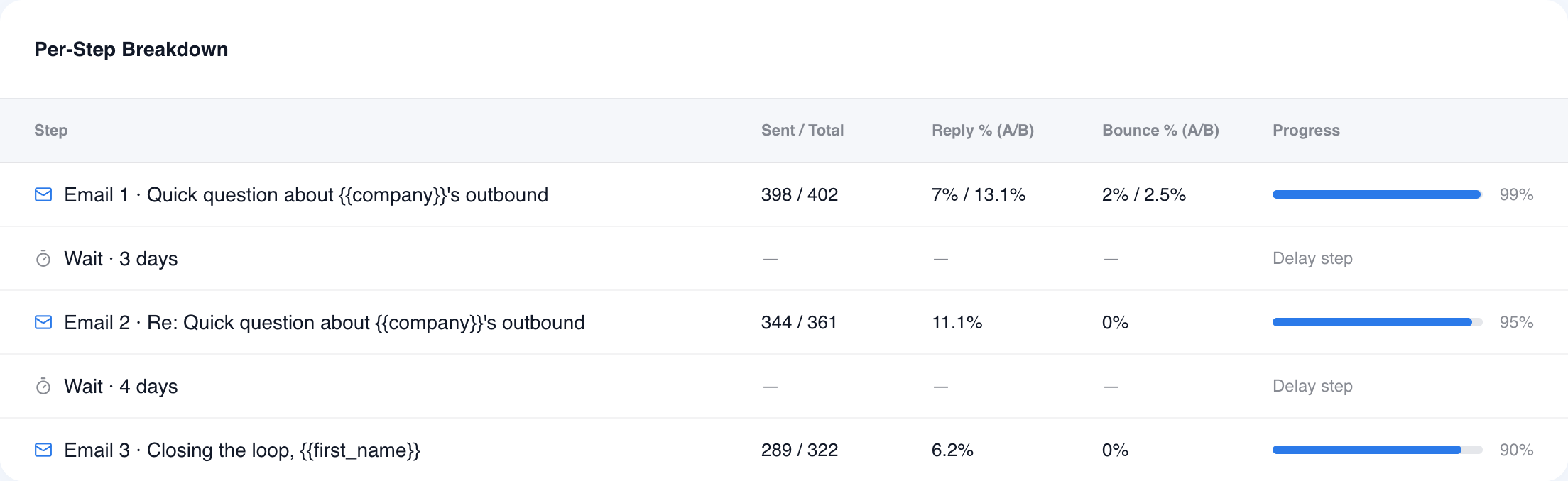
You find your winning subject line on real prospects, while the campaign runs. Write variant A and B for any step; replies and bounces are reported per variant, and when the numbers are in, one click applies the winner — every pending send switches instantly, no restart.
- You see reply and bounce rates per variant on every step
- Each contact keeps one stable variant — your test stays clean
- You apply the winner straight from the campaign list
You never burn your domain on a dead address
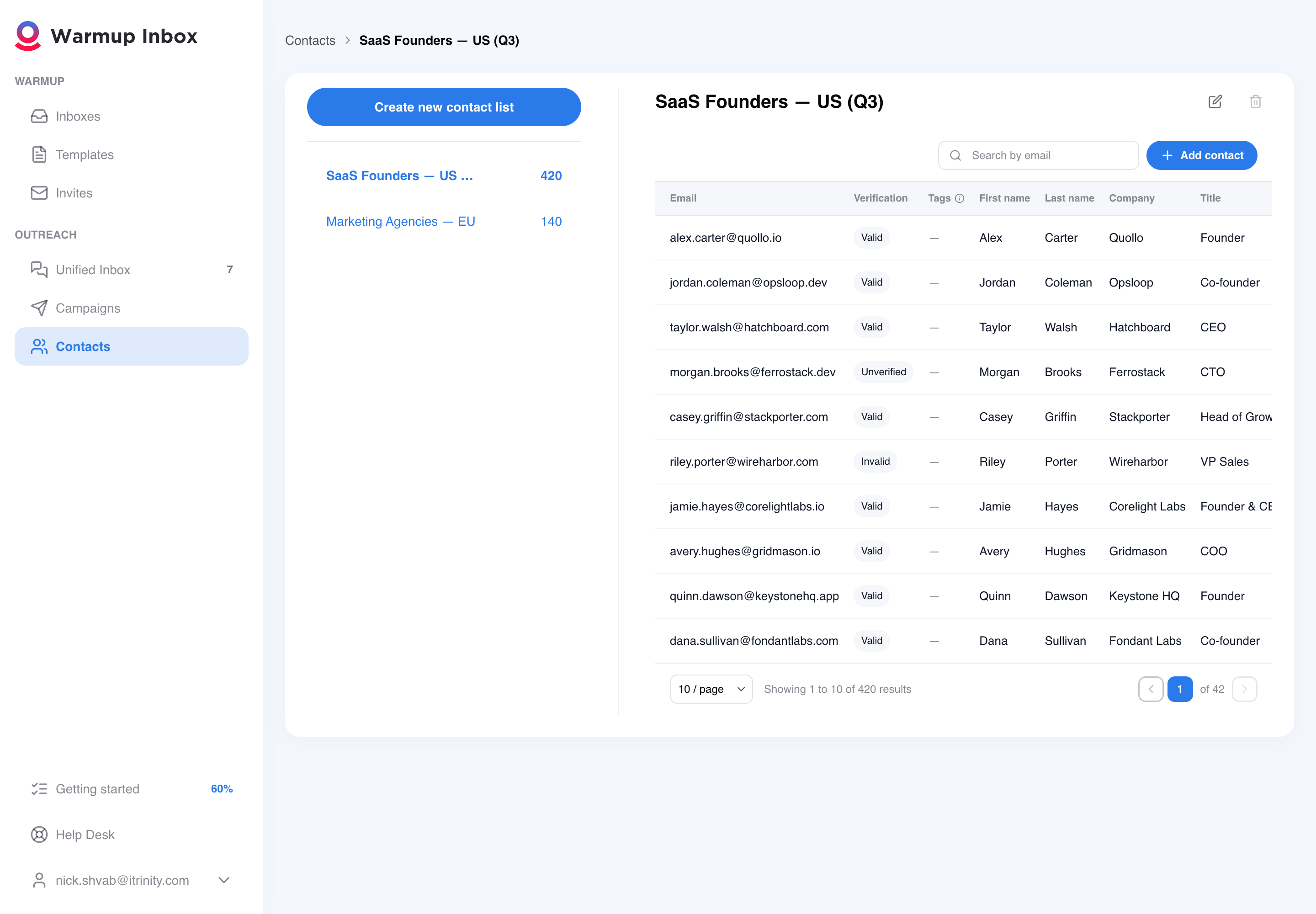
Your bounces stay near zero and your reputation stays intact — because every address is verified before the first send. Flip one switch at launch: the campaign won't start until verification finishes, and invalid addresses never receive an email. No separate tool, no CSV round-trips.
- You launch from inside the flow — verification is built in
- You see verification status on every contact in your lists
- Invalid contacts are excluded for you automatically
You never lose a hot lead in five mailboxes
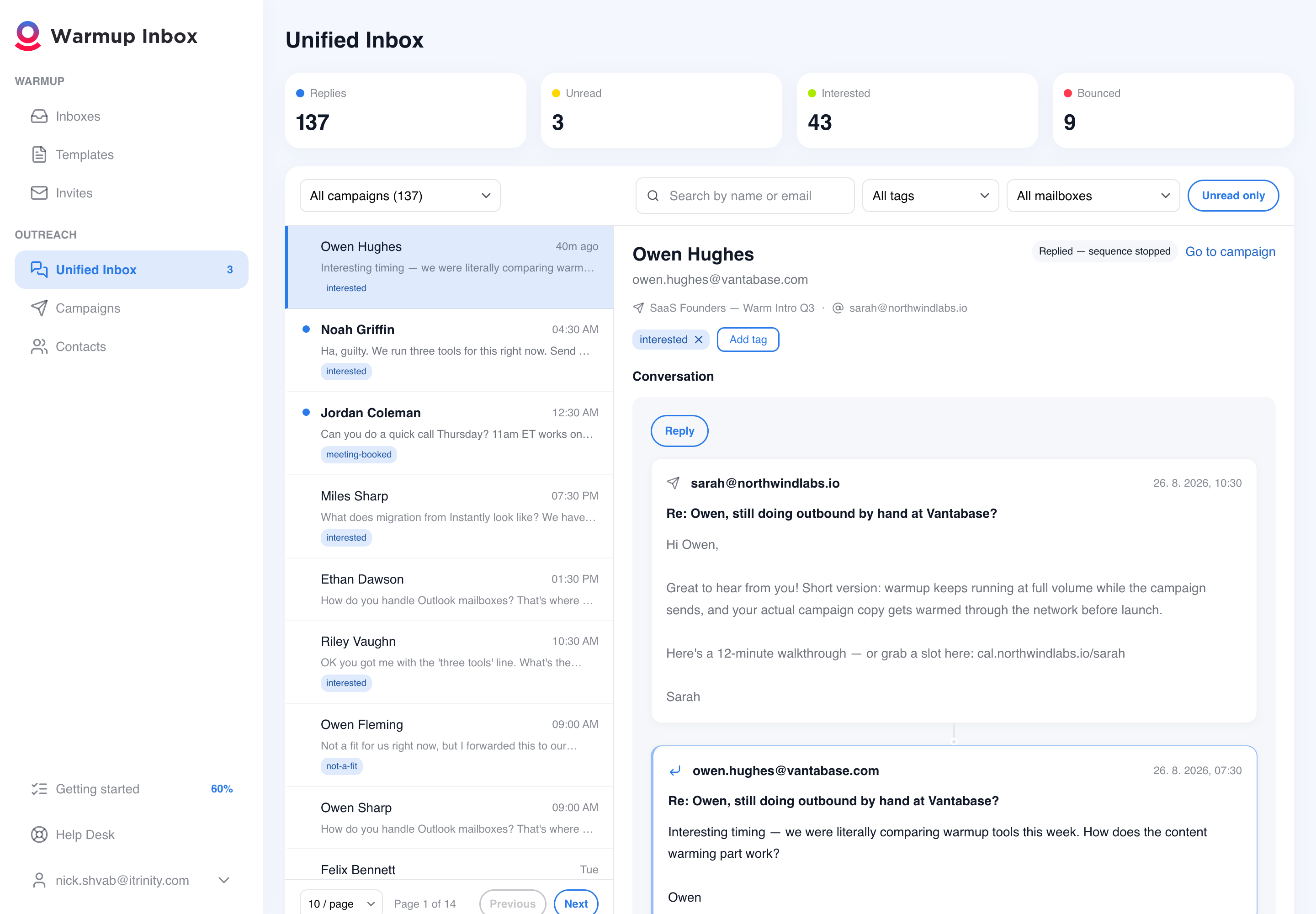
Every reply from every campaign and mailbox lands in one inbox. You filter by campaign, tag or sender and answer right there — your reply goes out from the same mailbox, inside the same thread, so the conversation never breaks.
- You filter by campaign, mailbox, tag, unread or bounced
- You tag and triage interested leads as they answer
- Your manual replies never touch the sending schedule
Sequences, contacts, testing, and the numbers behind them
Sequences that branch
Emails, waits and conditions. Branch on whether someone replied, clicked or bounced, then stop them, move them on, mark them interested, or notify your team.
Six templates to start from
Cold outreach, follow-up, re-engagement, product launch, meeting request, or start from scratch. Every one stops sending to a contact the moment they reply.
Contacts in, four ways
Pick a saved list, upload a CSV and map its columns to your variables, paste rows straight in, or add them by hand. Personalize from whatever fields your list actually carries.
Verification before you send
Clean the list with EmailListVerify before the first email goes out. Invalid addresses are flagged, not silently deleted, so you keep the list you paid for and decide what to do with it yourself.
A/B decided on replies
Test two versions of any email, set the split, and let the winner apply itself. Winners are picked on reply rate, because we do not pixel your emails to measure opens.
Per-sender health
Run a campaign across several inboxes and see each one's health score and connection state next to its send volume. When one mailbox starts dragging the campaign down, you can see which.
Every reply in one place, with none of the warmup noise
Once a sequence runs across several mailboxes, the replies scatter. This is where they land instead.
One screen, every campaign
Replies from every campaign and every mailbox together. Filter by campaign, mailbox or tag, search by name or address, and open the whole thread including what you sent, badged with the step and the variant that earned the answer.
Clean by construction, not by filtering
Other tools have to guess which inbound mail is warmup traffic and strip it out. We generate the warmup, so campaign replies are held somewhere else entirely. There is nothing to filter and nothing to get wrong.
Answer without switching tools
Reply from the mailbox that owns the conversation, inside the original thread, so nothing looks off to the person reading it. Tag conversations and manage replies without leaving the unified inbox.
Three steps, in the order that protects your domain
Warm first, send second. That order is the whole point.
Connect and warm your inboxes
Gmail, Outlook, SMTP or your ESP. Let the network build the reputation before you spend it.
Start free trialBuild the sequence
Start from a template or from scratch, add waits and conditions, and switch on content warmup so the first email starts warming right away. Send yourself a test through one of your own running inboxes and you see the real From address and the real authentication path, not a preview from someone else's server.
Import, verify, launch
Bring your contacts in, verify them, then pick your senders, your send window and your daily limit. Launch, and watch it from the campaign dashboard while the warmup carries on underneath. Campaign analytics update every two hours.
Who runs campaigns in Warmup Inbox
Your reps hit their numbers when their email lands. Simple as that.
Plug every rep's sending inbox into Warmupinbox. Reps focus on the pitch; ops watches the reputation dashboard. Reply rates climb together.
Frequently asked questions
Which inboxes can I send a campaign from?
Any inbox you have connected and warming. That restriction is deliberate rather than technical: the sending path and the warming path are the same one, so a campaign always goes out from a mailbox that has reputation behind it. If nothing is warming yet, connect an inbox first.
Do I have to turn my warmup down to run a campaign?
No. Your warmup volume stays the same when you launch a campaign. Warmup and campaign emails run from the same inbox at the same time, without reducing your warmup volume to make room for campaign sending.
Does Warmup Inbox track email opens?
No, and that is deliberate. Open tracking works by loading an invisible pixel from a remote server, which is one of the signals filters use to classify mail. We decided the deliverability cost is not worth the metric. A/B winners are decided on reply rate instead, and every number in campaign analytics is a send, a reply or a bounce.
What does content warmup actually do?
It takes the first email of your sequence and adds it to the warmup rotation on the inboxes you send from, starting when you create the campaign rather than when you launch it. So by the time a prospect receives that email, the network has already circulated it and engaged with it. If you are running an A/B test, both variants warm; when a winner is picked, the loser stops. Edit the email and the warmed copy updates to match.
What happens when someone replies?
That contact stops receiving the rest of the sequence, on every template we ship. The reply appears in your unified inbox with the full thread, and you can answer it there, from the right mailbox, without switching tools.
How many emails should a cold sequence have?
There isn't one sequence length that works for every campaign. Start with one of the included templates, then adjust the number of follow-ups and timing based on the replies you receive.
Can I import my existing contacts?
Yes. Pick a saved contact list, upload a CSV and map its columns to your variables, paste rows straight in, or add contacts by hand.
Do you verify my list before sending?
Yes, if you turn it on. Verification runs through EmailListVerify before the campaign starts sending, and invalid addresses are flagged rather than removed, so you keep the list and decide what to do with it.
Why is my cold email open rate low?
Low open rates are almost always a deliverability symptom — new domain, skipped warmup, sending too fast, or weak sender reputation. Run a placement test, audit your DNS records, and warm your inbox before scaling volume.
How do I know if I need email warmup?
You need warmup if any of these apply: new email account, first cold outreach campaign, volume scaling beyond 50 sends/day, low open rates, spam-folder placement, or restarting campaigns after a pause.
Keep warming. Start sending. Same inbox.
Sequences, verification, multi-inbox sending and every reply in one place, on a warmup network that keeps running the whole time.