What Is GlockApps? Email Testing, Pricing & Features
TL;DR (Quick Answer)
GlockApps is primarily built for testing and diagnosing email deliverability. Its Inbox Insight tool uses seed-list tests to show where messages land across different providers and filtering systems, while its wider toolkit covers DMARC, sender reputation, blacklists, and uptime monitoring. It can identify placement and reputation problems and point you toward possible causes, but it doesn’t generate the ongoing sending activity used to build sender reputation.
Inbox placement is only one part of figuring out why emails aren’t reaching their recipients. Authentication problems, sender reputation, blacklists, content, and individual spam filters can all affect where a message ends up.
GlockApps brings several of those checks into one product. Its best-known tool is Inbox Insight, but the wider suite includes DMARC analytics, reputation monitoring, blacklist checks, and uptime monitoring.
We took a closer look at GlockApps to see what its testing tools actually tell you, how much they cost, and who gets the most value from them in 2026.
Key takeaways
- GlockApps specializes in inbox placement and deliverability testing, not email warmup.
- Inbox Insight uses seed lists to check placement across different mailbox providers and filtering environments.
- Reports cover placement, spam filters, authentication, content, and recommended next steps.
- GlockApps also includes DMARC analytics, reputation and blacklist monitoring, and uptime monitoring.
- Paid Bundle plans start at $59 per month with annual billing, alongside a limited free plan.
Looking for a GlockApps alternative? See how Warmup Inbox compares.
What is GlockApps?
GlockApps is a suite of tools for testing and monitoring email deliverability.
Inbox Insight is the part most directly concerned with inbox placement. You send a test email to a GlockApps seed list, and the resulting report shows where it landed across different test accounts and filtering environments.
That can include the primary inbox, another tab such as Promotions, spam, or a missing result where the message wasn’t delivered to the seed address.
It doesn’t run an email warmup network or create ongoing sending activity to build reputation for a new mailbox.
GlockApps’ key features
GlockApps brings several deliverability checks into the same product, covering inbox placement, spam filters, authentication, sender reputation, DMARC, and sending infrastructure.
Inbox Insight and placement testing
Inbox Insight uses a seed list to test how an email is treated by different mailbox providers and spam filters.
GlockApps currently says its seed list covers 40 mailbox providers and five filtering environments. Rather than estimating placement from a model, the test records where the message actually lands in GlockApps’ test environments.
Results can show whether an email reached the inbox, another inbox tab, spam, or went missing. Provider-level results make it possible to see whether a problem is widespread or concentrated with a particular mailbox provider.
Seed tests still have limits. Placement in a GlockApps test inbox doesn’t guarantee that the same message will land in the same place for every real recipient, since mailbox providers can make filtering decisions based on individual recipient and sender history.
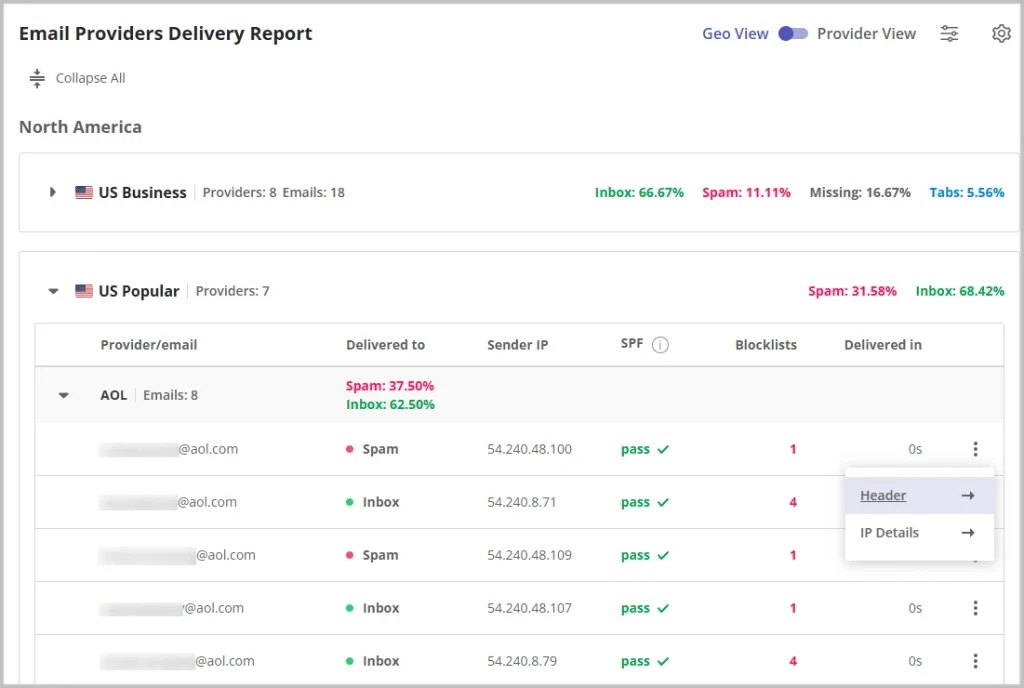
Source: GlockApps dashboard example
Spam-filter and content testing
GlockApps also tests emails against filtering environments including Google Spam Filter, Barracuda, SpamAssassin, Microsoft Exchange Online Protection, and Proofpoint.
The results include authentication and sender IP checks, content and HTML analysis, and recommended actions based on the issues found.
For Gmail, results can also distinguish between the Primary inbox and tabs such as Promotions.
DMARC analytics
GlockApps includes a separate set of tools for monitoring DMARC.
Users can see which sources are sending email on behalf of a domain, check SPF and DKIM alignment, and turn raw DMARC data into reports that are easier to investigate.
DMARC usage is also built into GlockApps’ Bundle pricing. Each plan includes a monthly message allowance, with overage charges on paid plans when that allowance is exceeded.
Reputation and blacklist monitoring
GlockApps monitors IP and domain reputation and checks sending IPs against public blacklists.
These checks can flag reputation problems that may be contributing to poor delivery. GlockApps also includes IP reputation monitoring within its plans, with the number of monitors depending on the subscription.
Uptime monitoring
Email testing isn’t the only thing GlockApps monitors. Its Uptime Monitor can watch websites and email infrastructure, including authentication records and sending IPs.
Alerts can be sent through email, Slack, or Telegram when a monitored service or record has a problem.
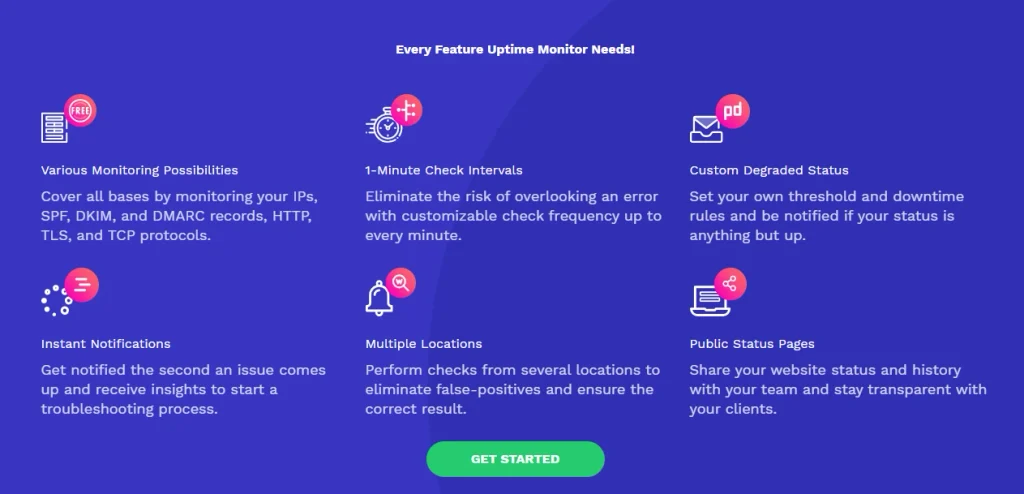
Source: GlockApps blacklist and uptime monitoring features
GlockApps pricing
GlockApps’ Bundle plans are priced by usage, with allowances for spam tests, DMARC messages, and monitoring features. Usage is based partly on spam-test credits and DMARC message volume.
| Plan | Monthly price | Annual price | Spam-test credits | DMARC messages |
| Free | $0 | $0 | 2 | 10,000 |
| Essential | $85/mo | $59/mo | 360 | 600,000 |
| Growth | $142/mo | $99/mo | 1,080 | 1.2 million |
| Enterprise | $185/mo | $129/mo | 1,800 | 12 million |
Spam-test credits are consumed when you run Inbox Insight tests. GlockApps also sells separate credit packs, with different validity periods depending on the pack.
DMARC allowances work separately. Paid Bundle plans charge overage fees when the number of DMARC messages exceeds the amount included in the subscription.
Note: All prices are current as of September 2026. Please verify live pricing before purchase.
What GlockApps users say
GlockApps currently has a 4.2 out of 5 rating on G2 from 29 reviews.
Positive reviews frequently mention the amount of detail available in its deliverability reports. Users also praise the interface and the ability to move from a placement problem to specific authentication, content, or reputation issues without working through raw data themselves.
Actionable recommendations are another recurring positive. These tips are another recurring positive, with reports pointing users toward potential problems and changes to investigate.
Critical feedback is less consistent. Individual reviewers mention a learning curve, customer support, payment or verification issues, and missing capabilities such as email rendering tests.
| Pros | Cons |
| Detailed inbox placement testing | No automated email warmup |
| Provider and spam-filter level results | Tests use a credit allowance |
| Action steps alongside test results | Monthly billing is considerably more expensive than annual billing |
| Limited free plan for occasional testing | Separate tools are still needed for jobs such as email rendering and warmup |
| Reputation, blacklist, and uptime monitoring | Larger toolkit may be overkill if you only need email warmup |
Who is GlockApps best for?
GlockApps is geared toward senders who need to investigate deliverability problems in detail, whether they’re managing their own email program or monitoring deliverability for clients.
Senders troubleshooting inbox placement
If campaign performance has changed and you want to see where messages are landing, Inbox Insight gives you a way to test placement before or between real sends.
Provider-level results can also show whether the problem appears across the test environment or is concentrated with particular mailbox providers or filters.
Deliverability specialists monitoring sender health
Deliverability problems don’t always show up as a sudden drop in inbox placement. GlockApps also gives specialists ongoing visibility into DMARC, authentication, sender reputation, and blacklists, so changes can be investigated alongside regular placement tests.
Agencies monitoring client deliverability
GlockApps’ higher plans support more users, testing credits, DMARC traffic, and monitoring capacity.
Enterprise also supports white-labelled shared reports, which can be useful when deliverability results need to be presented directly to clients.
Do you need everything GlockApps offers?
GlockApps gives you a lot of information about what happens after you hit send. You can see where test emails land, check individual filtering environments, investigate authentication and reputation issues, and monitor DMARC data over time.
That level of detail is useful when you’re actively troubleshooting deliverability or managing it across multiple domains.
But if a new or under-used inbox needs to establish a sender reputation, diagnostic data alone won’t change how mailbox providers treat its emails.
Warmup Inbox for email warmup
Warmup Inbox automatically builds sending history and sender reputation through a network of real inboxes.
Your inbox gradually exchanges emails through a network of more than 30,000 real inboxes, generating the opens, replies, and important markings that signal legitimate engagement to mailbox providers. Sending activity increases over time, while placement, blacklist, and authentication monitoring let you see how your deliverability changes along the way.
You’re also protected by hourly monitoring across more than 50 blacklists. When you want to check placement directly, you can run a free email deliverability test without signing up.
GlockApps gives you deeper diagnostic tools for investigating deliverability problems. Warmup Inbox actively builds the sender reputation that GlockApps measures and diagnoses. If you want to warm a new inbox, rebuild a damaged sender reputation, or keep an active inbox in good standing, that’s the job it’s built to do.
Warmup Inbox starts at $19 per inbox monthly or $15 per inbox per month with annual billing. You can try it free for seven days, with no credit card required.
Frequently Asked Questions
What does GlockApps do?
GlockApps tests and monitors email deliverability. Its tools cover inbox placement, spam-filter testing, DMARC analysis, authentication, IP and domain reputation, blacklists, and uptime monitoring.Does GlockApps warm up email accounts?
No. GlockApps doesn’t offer automated email warmup. Its tools are built for testing, diagnosing, and monitoring email deliverability.How much does GlockApps cost?
GlockApps has a limited free plan. Paid Bundle plans start at $59 per month with annual billing or $85 with monthly billing. Plans include different allowances for spam-test credits, DMARC messages, users, and monitoring tools.Does GlockApps have a free plan?
Yes. The free Bundle plan currently includes two spam-test credits and 10,000 DMARC messages per month, along with limited reputation and uptime monitoring.What is the difference between GlockApps and Warmup Inbox?
GlockApps specializes in testing and diagnosing email deliverability, with detailed seed-list testing, spam-filter results, and DMARC analysis. Warmup Inbox specializes in automated email warmup and sender reputation, with placement, blacklist, and authentication monitoring alongside it.